MeeGo Icon Pack APK
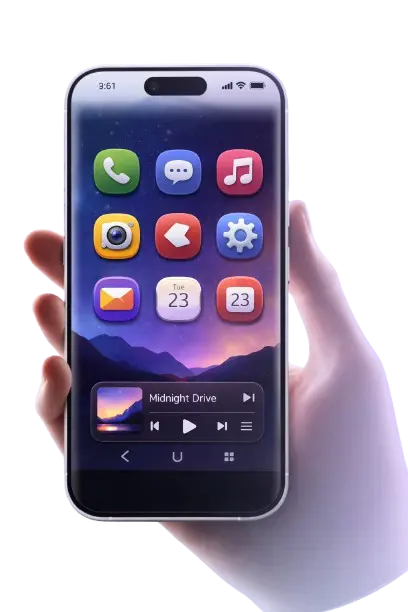
Bring the Nokia N9 look to your Android home screen with modern flat Meeye and Meeyo squircle icons. Download the MeeGo Icon Pack APK, explore matching wallpapers, and create a clean, dark setup that feels simple, premium, and original.
App Information
Version
O-6.7
Last Update
Aug 7, 2024
Downloads
120K+
Size
81 MB
Rating
4.9
Developer
Yeye the Devil
File Type
APK
Why MeeGo Icon Pack Feels Different
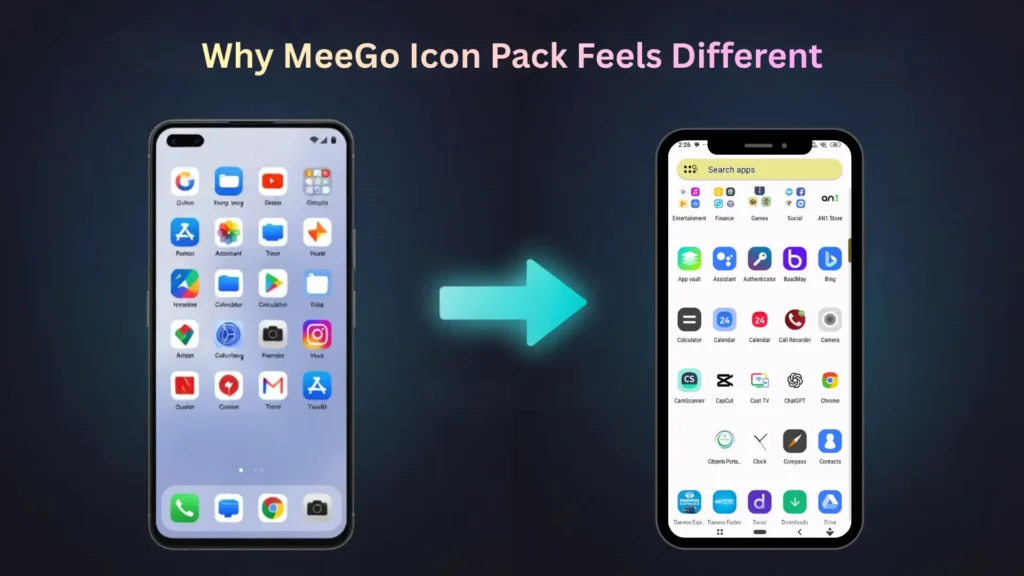
MeeGo Icon Pack APK is designed with the Nokia N9’s iconic Harmattan style in mind. The icons in this pack are created in a high-quality 192×192 px size, so they look sharp and clear even on the high-density screens of modern Android phones. Its icon-masking support helps give the MeeGo-style squircle design to apps that aren’t officially themed. This makes your home screen look cleaner, more matching, and polished, which is very important for those who prefer a simple and premium setup.
Harmattan-Inspired Design
Inspired by the Nokia N9’s iconic Harmattan style, offering a unique, polished design for your icons.
192×192 HD Icons
High-quality 192×192 px resolution ensures clarity and sharpness even on high-density screens.
Icon Masking Support
Helps apply the Meego-style squircle shape to icons, even if they aren’t officially themed.
Clean Consistent Look
Maintains a clean, consistent design across all icons for a cohesive user experience.
MeeGo — The OS That Was Ahead of Its Time
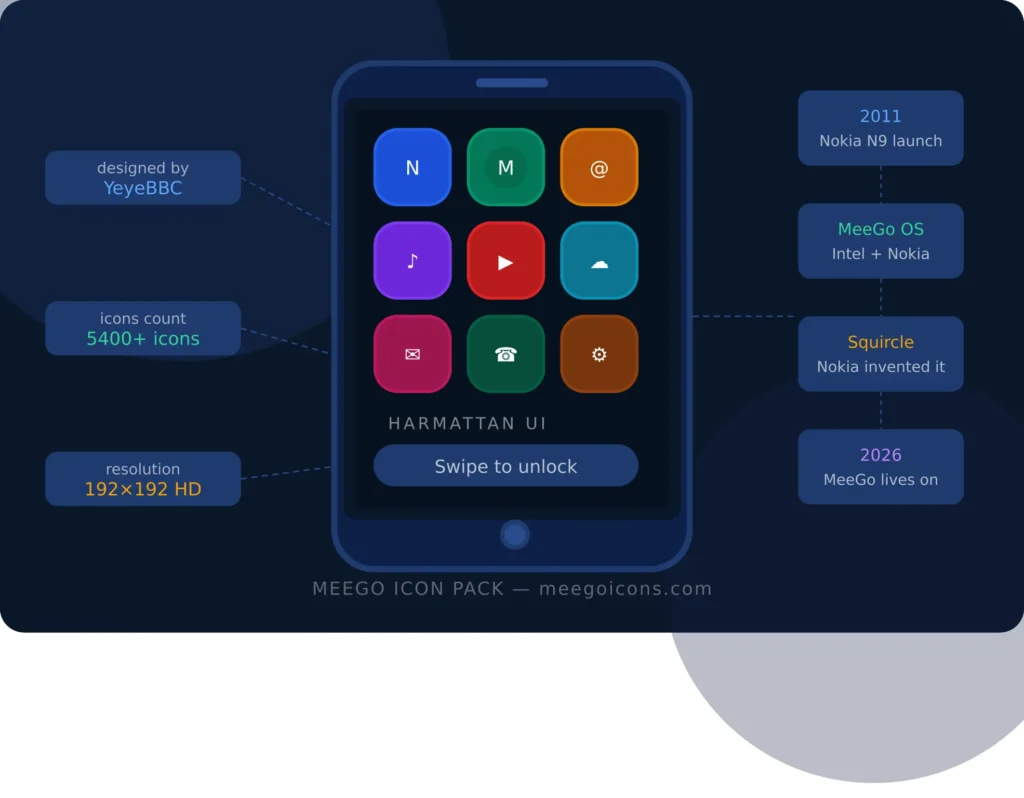
When Nokia launched its Nokia N9 in 2011, the world was looking towards Android and iOS. But Nokia did something different – they created MeeGo OS, which was quite ahead of its time.
MeeGo was an operating system developed jointly by Intel and Nokia. Its interface, called Harmattan UI, was completely different – no buttons, no complicated menus. Just smooth swipe gestures. You just swipe in any direction and the phone responds.
This was something that even today’s modern phones have not implemented properly. But the biggest identity of MeeGo was its squircle icons. It was neither a complete circle nor a square – a perfect mix of both. Nokia designed this shape mathematically so that it looked natural to the human eye. Today Apple, Google, and others are all using this shape – but Nokia did this in 2011.
The sad thing is that Nokia used MeeGo in only one phone – Nokia N9 – and then discontinued it due to the Microsoft deal. But people who have used Nokia N9 still say that no other phone gave that experience.
To keep this nostalgia and that premium design alive, developer YeyeBBC created Meeye and Meeyo icon packs. These packs bring that original Harmattan squircle feel to your Android phone — with over 5400 icons, in HD quality, absolutely free.
MeeGo is gone, but its design lives on.
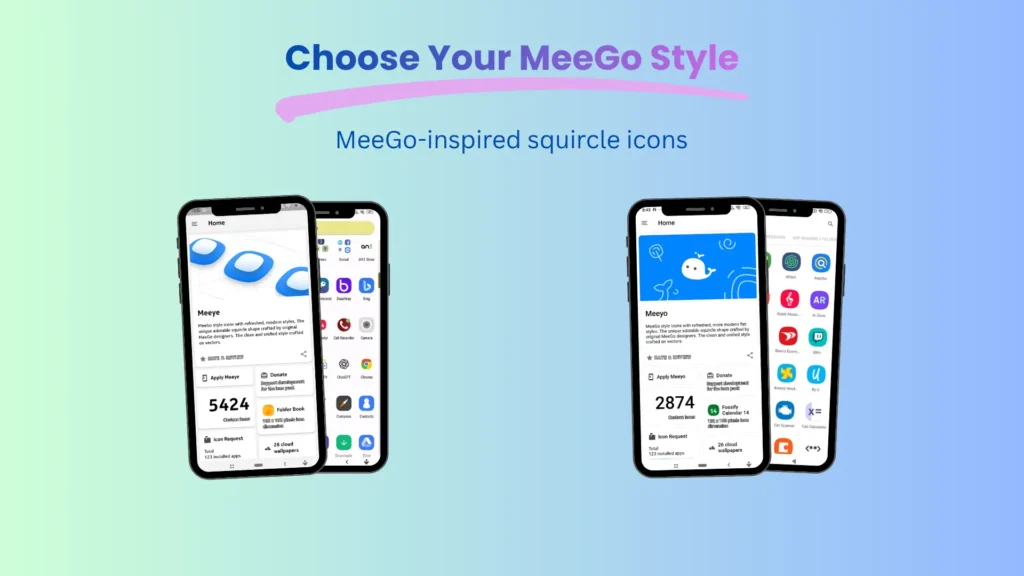
Choose Your MeeGo Style
Both Meeye and Meeyo are based on MeeGo-inspired squircle icons, but they don’t look the same. Choosing your style before downloading makes it easy.
Meeye icon pack
Meeye icons are better for users who want a classic look like the original Nokia N9. This style has a subtle depth and soft gradients, giving the icons a more premium, nostalgic feel.
Meeyo icon pack
Meeyo style icons are a good choice for those who prefer a clean, flat, and modern setup. It looks great with dark wallpapers and minimalist home screens.
Compatible Launchers for MeeGo Icon Pack
The MeeGo Icon Pack APK works best with Android launchers that support custom icon packs. Choosing the right launcher makes icons look cleaner, spacing better, and the overall home screen look more polished. For the best results, use a third-party launcher. Below is our tested list of different launchers. Pick the one that fits your requirements.
Nova Launcher
Nova Launcher is a great choice for users who want more control over their home screen. You can adjust the icon size, grid, spacing, and layout to your liking. This makes the MeeGo squircle icons look more balanced, neat, and premium. If you prefer to build your setup with detail, Nova Launcher is a strong option.

Smart Launcher
Smart Launcher is useful for users who prefer a more organised home screen. Its layout helps manage apps better, and with MeeGo icons, this setup looks even cleaner. If you want your home screen to look simple and be easy to use, Smart Launcher is a good option.
Niagara Launcher
Niagara Launcher is a strong choice for minimalist users. Its simple layout and focused design make the MeeGo icons appear more prominent and stylish. If you want a clutter-free home screen where everything is clean, straightforward, and easy to use, Niagara Launcher may suit you.
Lawnchair Launcher
Lawnchair Launcher is good for those who prefer a clean and simple Android look. Its interface feels light and smooth, making the MeeGo icons look natural and well-matched on the home screen. If you want a simple setup without extra clutter, Lawnchair can be a very suitable choice.
Every launcher has its own style, so the best choice depends on your personal preference. If you want more control, Nova Launcher is better, if you want a clean stock-like look, Lawnchair is good, if you like an organised setup, Smart Launcher is useful, and if you want a minimalist style, Niagara Launcher is a strong choice.
How to Download and Apply MeeGo Icon Pack APK on Android
Applying the MeeGo Icon Pack APK is not very difficult. First, install a supported launcher on your phone, such as Nova Launcher, Lawnchair Launcher, Smart Launcher, or Niagara Launcher. Then download and install the MeeGo icon pack, then go to the launcher settings, open the icon pack option and select the MeeGo pack.
To guide you, we have prepared a pictorial guide of the complete process below. By following these steps, you can install Meego Icon pack on your Android phone and get the real Nokia N9 vibe.
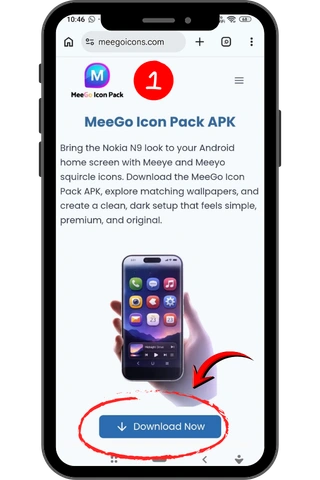
- Open “https://meegoicons.com” in your browser and click the the download button
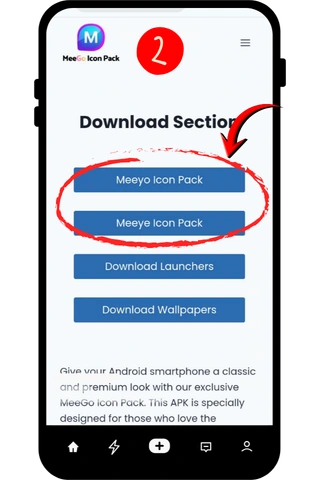
- From “Download Section“, click Meeye or Meeyo icon pack download button to start the download.
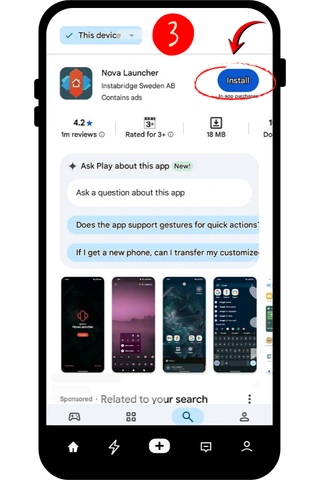
- Download your preferred launcher from Google Play Store or from our website.
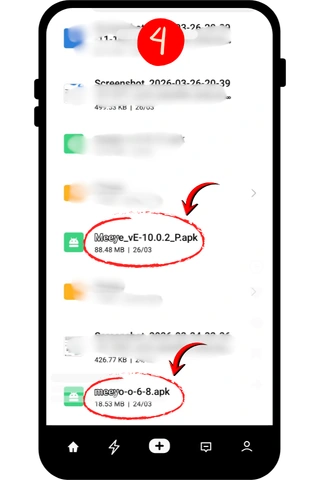
- Open “File Manger” and click the icon pack you already downloaded to start installation.
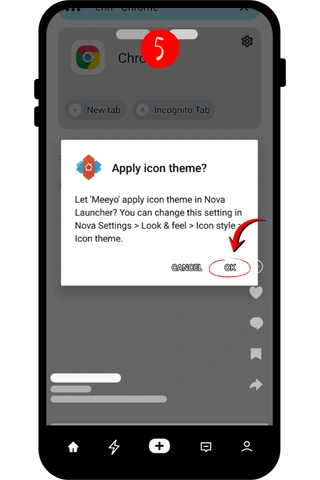
- Once installed, Open the launcher and select the icon pack from the list and press the “OK” button to apply the Nokia N9 squircle icons on your Android setup.
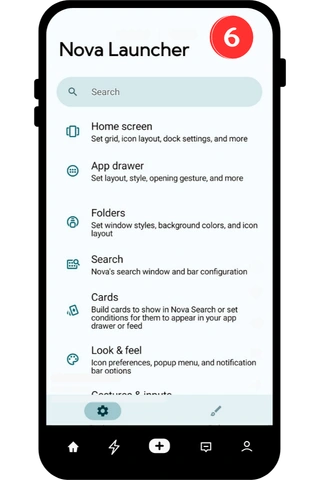
- Open launcher settings to adjust the icon size, appearance, wallpapers etc.
Adjust Icon Size for a Better Look
It’s also useful to slightly adjust the icon size for the best MeeGo look. In some launchers, icons may appear too small or too large at the default size, so it’s best to adjust the grid and icon size to your screen. Meego icon pack apk gives an original feel at the size of 125%. Once the spacing and size are correct, the home screen looks cleaner, more balanced, and closer to the original Nokia N9 Vibe.
What to Do If Icons Won’t Change
If the icons don’t change, first check that you’re using a supported launcher and that the icon pack is applied correctly. In some cases, reopening the launcher, re-selecting the icon pack, or restarting the phone fixes the problem. If some app icons still look the same, they can be manually edited, since not every app behaves the same way on every launcher.
With just a few simple steps, you can give your Android home screen a clean, smooth, and MeeGo-inspired look.
Wallpapers That Complete the MeeGo Look
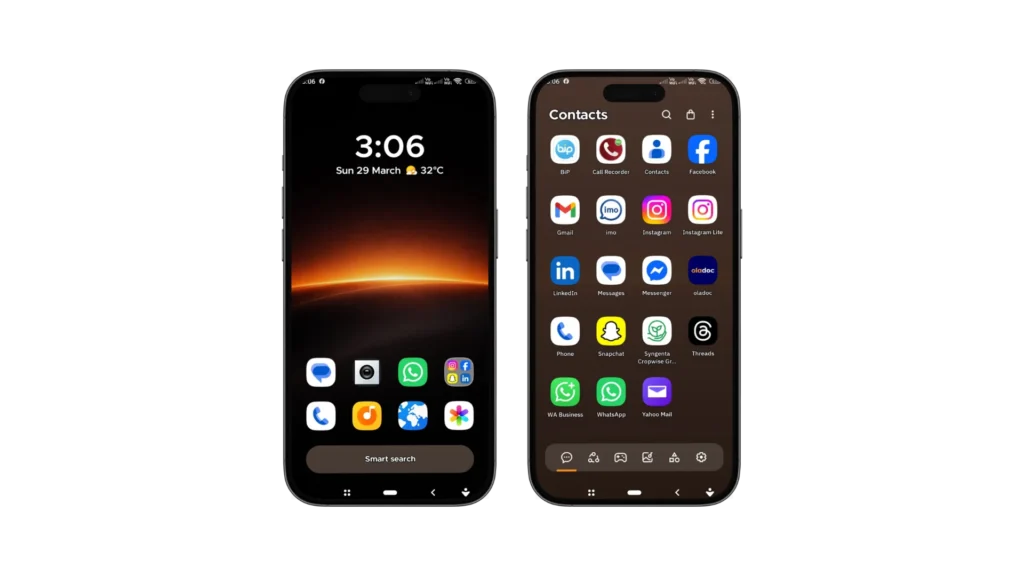
MeeGo icons look most original when paired with the right wallpaper. Dark backgrounds, soft gradients, muted colors, and clean textures make icons appear more clear and balanced. That’s why we’ve chosen wallpapers that naturally blend with the MeeGo squircle style and give the home screen a sleek, premium, and Nokia N9-inspired look. If you want to see the entire collection, you can explore our Top 10 premium wallpapers section.
How to Uninstall Meego Icon Pack?
If you have MeeGo Icon Pack installed on your Android phone and now you want to remove it, then you can follow the steps given below.
Note: If you applied the Meego Icon Pack to a Launcher like Nova Launcher or Apex Launcher, first go to that launcher's settings and restore "Default Icons". It's important to do this first — otherwise some icons may appear blank or missing.
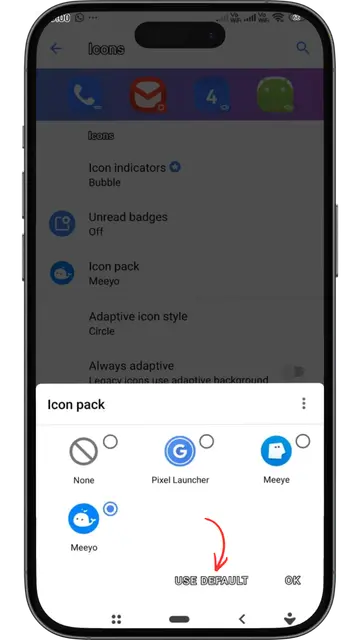
Method 1 — Uninstall from Settings
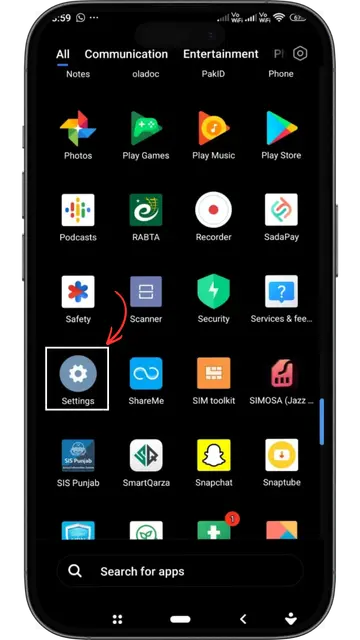
Open the Settings app
- Open the Settings app on your Android phone. It’s visible by the gear icon—or you can access it from the notification bar.
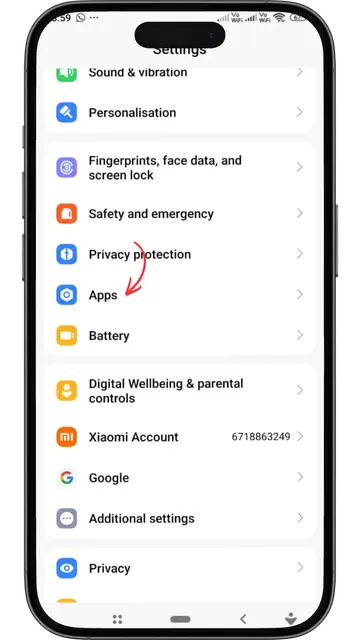
Go to Apps or Applications
- Go to “Apps,” “Applications,” or “App Manager”—whichever is the case for your phone model. On Samsung, it’s “Apps,” on Xiaomi, it’s “Installed Apps.”
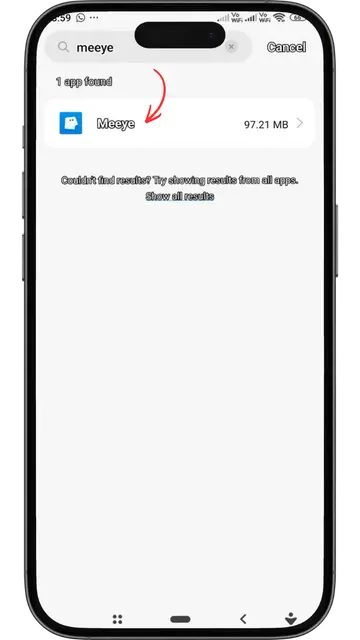
Search for Meego
- Type “Meeye or Meeyo” in the search bar above whichever icon pack you have installed on your phone or scroll through the list.
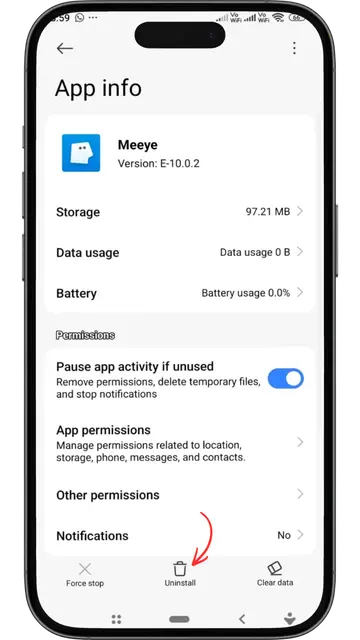
Press the Uninstall button
- Tap the Uninstall button and confirm when prompted. The icon pack will be removed from your phone in a few seconds.”
The Meego Icon Pack has been removed from your phone. Your phone will revert to its previous default icons.
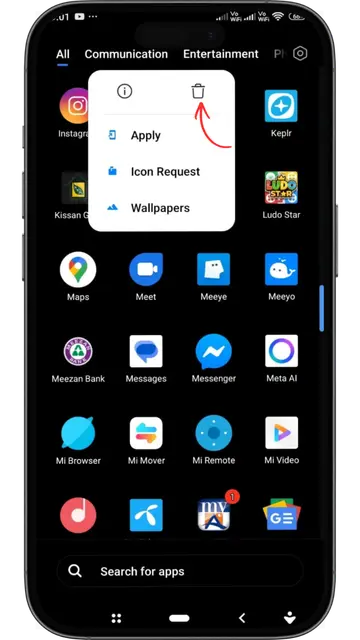
Method 2 — Directly from the Home Screen
Press and hold the app
- On the Home screen or in the App Drawer, press and hold the Meego Icon Pack icon until no menus or options appear.
Select the “Uninstall” option
- In the popup that appears, find the “Uninstall” or “Remove” option and tap it. On some phones, this icon can also be found by dragging it directly.
Confirm
- Press “OK” or “Uninstall” in the confirmation dialog. The app will be removed in a few seconds.
FAQs
About the Developer

YeyeBBC
Lead Designer & Developer
YeyeBBC is the visionary creator behind the acclaimed Meeye and Meeyo icon packs. Driven by a deep passion for minimalist aesthetics and the timeless legacy of the Nokia N9, he has meticulously crafted these packs to bring the iconic Harmattan squircle design to modern Android devices. Every icon is a tribute to clean design, ensuring your home screen feels both nostalgic and premium.